


Weatherzone: Weather Forecasts
4.5940.00 Reviews
App Specs
- Version
- 7.6.1
- Updated On
- License
- Free
- Downloads
- 5,000,000+
- Developer
- DTN APAC Pty Ltd
- Categories
- Weather
- Platform
- Android, iOS
Screenshots
 Analysis by AppCompare
I often check a weather app for a simple reason: I want to know whether the day will stay manageable once I leave home. Weatherzone: Weather Forecasts is built for that everyday decision, but it also gives weather watchers more to explore than a single temperature reading. I find its mix of short-term detail, longer outlooks and radar most useful when the forecast may affect plans rather than just satisfy curiosity.
What the current app is best at
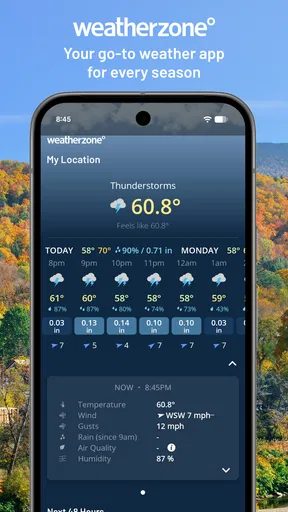
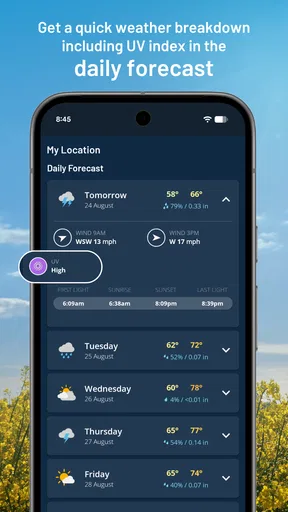
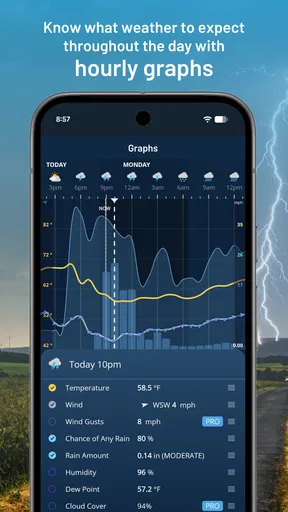
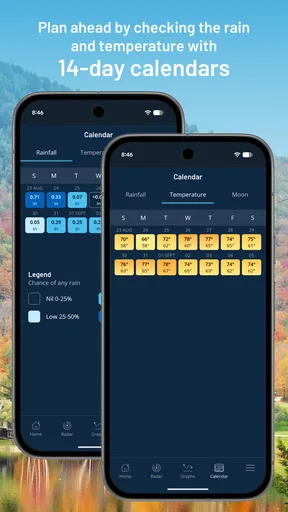
Weatherzone is a free weather app from DTN APAC Pty Ltd. Its US-focused forecast coverage includes hourly conditions and an outlook reaching 14 days, alongside rain and snow radar and customizable graphs. Those tools make it a practical choice if you want to check the next few hours before commuting, then look further ahead when arranging an outdoor plan.
The difference between those time scales matters. An hourly view can help answer whether to walk now or wait for a shower to pass; the two-week outlook is better treated as a broad planning guide than a promise about a particular afternoon. I use longer forecasts to spot the general shape of a week, then return to the near-term forecast before committing to weather-sensitive plans.
How the details help with real decisions
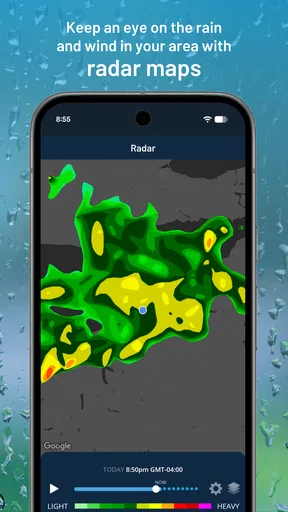
Radar is most useful when I already know what I need to decide. Before leaving for a walk or setting out on a drive, I can use the map to see whether precipitation appears to be approaching my area, rather than relying only on a daily icon. It is still a forecast tool, not a guarantee that every street will get the same conditions, so I would pair it with common sense when timing matters.
Custom graphs offer another way to read conditions. Instead of scanning separate numbers and trying to remember how they might change, I can compare the information visually and look for a pattern across the day. That is handy for choosing a time to exercise outdoors or deciding whether a planned errand is easier in the morning or later. The trade-off is that graphs are less helpful if all you want is a quick glance at the current temperature.
A realistic use is planning a school run, a commute or a weekend outing when rain could change what you carry. I would check the hourly forecast before leaving, glance at radar if showers look possible, and use the longer outlook only to decide whether the general plan seems sensible. That sequence gets more value from the app than treating the first screen as the final word.
Where it fits among weather apps
Compared with a basic weather app that mainly presents current conditions and a daily forecast, Weatherzone gives me more ways to inspect timing and precipitation. That can be worthwhile for someone who regularly plans around rain or snow. On the other hand, if you prefer the simplest possible screen and rarely look beyond the day’s high and low, a built-in phone weather app may feel quicker and less involved.
Worth Reading Before You Choose

EA SPORTS FC Mobile 26 Is a Bigger Football Game, but It Takes Time

Flipboard Shows What News Apps Must Do Beyond the Feed

Switching to Android Auto Means Rethinking Your Driving Routine

Google Calendar Makes a Crowded Week Easier to Manage

Ludo King Makes the Most of the Minutes Between Plans

Baby Panda World Brings Quick Play to Modern Phones, but Its Game Library Feels Busy
It also suits people who like to compare several locations, such as checking conditions near home and at a destination before travelling. Switching places makes that workflow convenient, though it takes a moment to choose the right location and interpret each forecast. I would not treat a location forecast as a substitute for checking the route itself when conditions could vary along a longer journey.
Who should try it, and what to keep in mind
I would recommend Weatherzone to people who want more than a daily summary but do not need a specialist forecasting workstation. It can be useful for outdoor workers, commuters, parents planning around school activities and travellers deciding what kind of weather to expect. If you only check the weather occasionally, or want a highly stripped-back experience, its extra layers may not add enough to your routine.
The app is rated for Everyone and has a 4.4 average from around 165,000 ratings, with more than five million installs. It first appeared in 2011, and version 7.6.0 is the current release. Those details suggest a long-running product with a substantial audience, but they do not tell me how any particular forecast will perform in a specific neighbourhood. I would judge it by whether its local outlooks are useful for the decisions I actually make.
What may matter as you use it
Weatherzone is free to download, with optional in-app purchases priced from $3.99 to $4.49 per item. I would start with the free experience and see whether the forecast views, radar and graphs fit my routine before considering any paid extras. The app requires Android 8.0 or later on Android; people using older devices should check compatibility before planning around it. Its current version number is a concrete sign of ongoing product iteration, though I would not assume that a version change guarantees a particular feature or improvement.
For existing users, the sensible approach is to keep using familiar forecast views while checking what has actually changed after an update, rather than expecting a redesign or new capability from the version number alone. I would also revisit saved locations and notification choices when my routine changes, so alerts remain useful instead of becoming background noise. The most important thing to watch is whether the information stays clear and timely for the places I care about.
Getting Started with Weatherzone
First things first, downloading and installing Weatherzone is a breeze. Available on both Android and iOS, it’s a quick search and tap away in the app store. As soon as you open it, you’re greeted with a clean, intuitive interface that’s really easy on the eyes. No clutter, no ads popping up like unwanted guests—just straightforward weather info.
Features: More Than Just Temperatures
Sure, every weather app tells you the temperature, but Weatherzone takes it up a notch. It offers detailed forecasts including humidity, wind speed, and even UV index. Feeling adventurous? Check out the radar maps that show real-time precipitation and storm tracking. It's like having a mini meteorologist in your pocket!
But wait, there's more. One feature that really caught my eye is the long-range forecast. Planning a vacation? Weatherzone gives you a peek into the future, up to 28 days ahead. No more guessing whether to pack those flip-flops or snow boots.
User Experience: Smooth Sailing
Navigation is a breeze, literally. The app’s layout is intuitive, with everything just a tap away. Want to switch locations? Easy peasy. Just type in the city, and boom—you’ve got your weather. I was impressed with how quickly it updates and how little data it seems to use, which is great if you're on a limited plan.
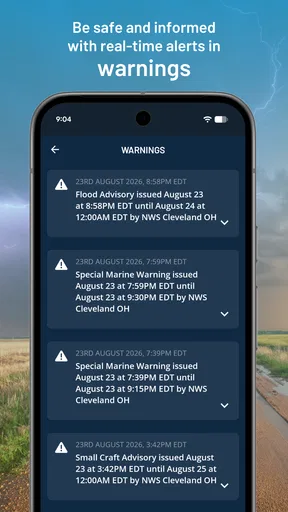
The app also supports notifications, which means you can get a heads-up about severe weather alerts or when it’s time to bring in the washing. It's like having a personal assistant who’s obsessed with the weather.
The Visuals: Eye Candy for Weather Enthusiasts
Okay, let’s talk about the visuals. The app’s design is minimal yet striking, with colorful icons and graphs that make checking the weather feel less like a chore and more like a treat. The radar maps are particularly engaging, offering a detailed view that’s not only informative but also kind of fun to watch.
Why You Should Download It
So, who is this app for? Honestly, anyone who steps outside! Whether you’re a casual weather checker or someone who needs detailed forecasts for work or travel, Weatherzone has got you covered. It’s especially useful if you live in an area with unpredictable weather patterns. The app's accuracy and comprehensive data make it a standout choice among many others.
In a nutshell, Weatherzone: Weather Forecasts is like that reliable friend who always tells you if you need a coat or an umbrella. With its user-friendly design, accurate forecasts, and those nifty radar maps, it’s definitely worth a spot on your home screen. So next time you’re wondering whether to picnic or hunker down inside, just tap on Weatherzone and get the lowdown.
Pros
- Accurate local weather updates.
- Customizable weather alerts.
- User-friendly interface design.
- Detailed hourly forecasts.
- Interactive radar maps available.
Cons
- Ad-supported free version.
- Limited features without subscription.
- Occasional slow load times.
- Battery usage can be high.
- Requires constant internet access.
FAQs for Weatherzone: Weather Forecasts
What features does Weatherzone offer?
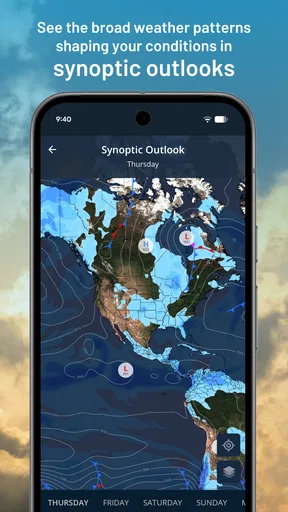
Weatherzone provides comprehensive weather forecasts, including current conditions, hourly updates, and long-term forecasts. Users can access radar maps, weather warnings, and detailed climate information. The app also offers customizable alerts to keep you informed about changing weather patterns specific to your location.
Is Weatherzone free to use?
Weatherzone offers both free and premium versions. The free version includes basic weather forecasts and updates, while the premium version, Weatherzone Plus, offers additional features such as more detailed weather data, ad-free usage, and advanced alerts. Users can choose based on their preferences and needs.
How accurate are the forecasts on Weatherzone?
Weatherzone is known for its accuracy, utilizing data from a variety of sources, including meteorological organizations and advanced satellite technology. The app’s precision is enhanced by its ability to provide localized forecasts, making it a reliable choice for users who need up-to-date weather information.
What devices are compatible with Weatherzone?
Weatherzone is available for both Android and iOS devices, ensuring compatibility with a wide range of smartphones and tablets. The app is regularly updated to support the latest operating systems, providing a smooth user experience across different devices.
Can Weatherzone be customized to my preferences?
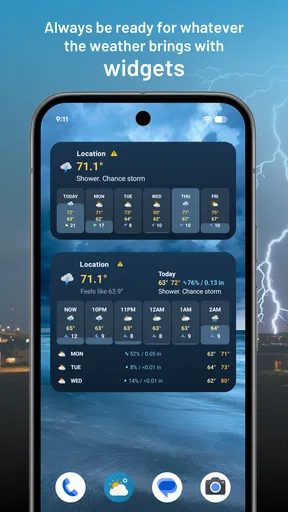
Yes, Weatherzone allows extensive customization. Users can select preferred locations, set up personalized weather alerts, and choose from various display options to tailor the app’s interface and notifications to their liking. This flexibility makes it easy to prioritize the information most important to you.


